Google Search Console AI Update: The Biggest GSC Feature in Years
Google Search Console's new AI update enables natural language queries for performance reporting. Discover how to use AI prompts to find high-intent keywords and low-hanging fruit.

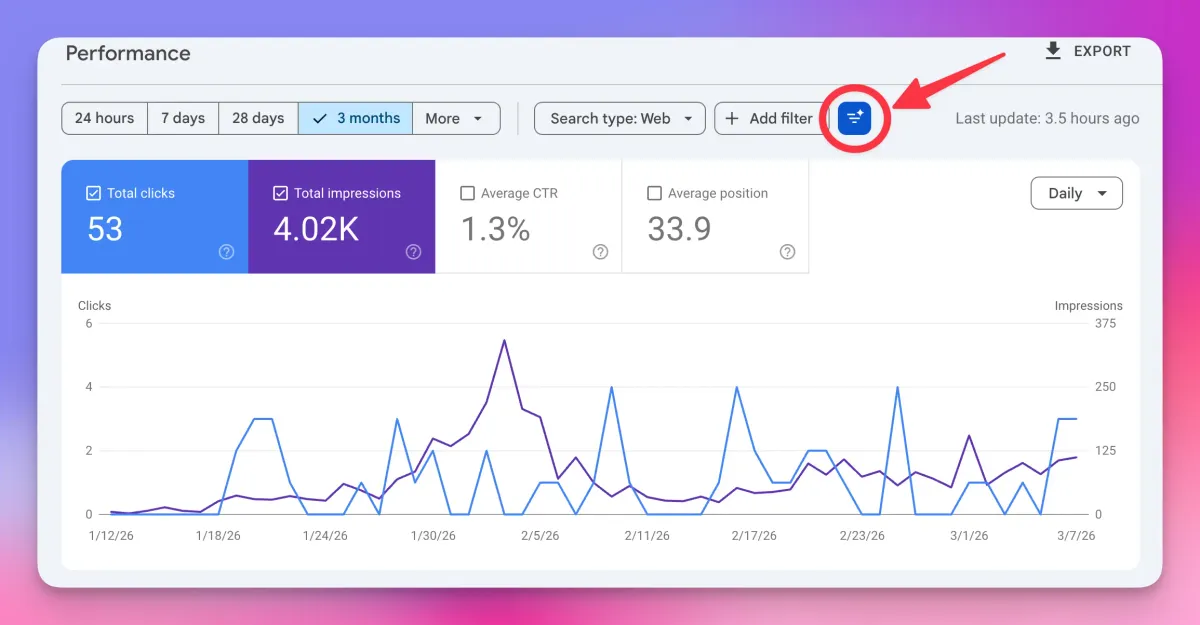
Google has quietly released its most significant Google Search Console update in many years, introducing AI-powered natural language querying capabilities that fundamentally change how SEOs analyze and optimize their search performance. This groundbreaking feature allows users to customize their performance reports using conversational AI prompts—a game-changing addition to an already essential SEO tool.
What Is Google Search Console?
For those new to SEO, Google Search Console (GSC) is Google's official tool for accessing and managing your site's presence in Google Search. It provides:
- Direct access to Google's search index
- Website and individual page submission capabilities
- Detailed visibility into indexing issues
- Comprehensive ranking data and keywords your site targets
- Click-through rates (CTR), impressions, and average position metrics
- Critical SEO analytics and performance insights
Google Search Console is an indispensable tool in any SEO's toolkit, and this AI update makes it exponentially more powerful.
The Google Search Console AI Update: Natural Language Query Feature
How the AI Feature Works
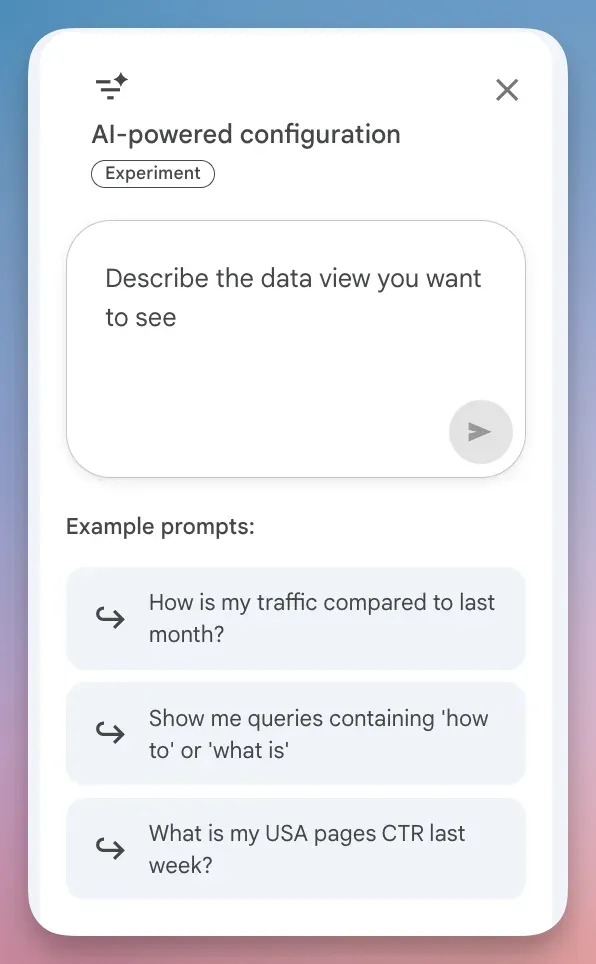
The new Google Search Console AI update introduces a blue button labeled "Customize your performance report using AI" next to the filter options in your Performance Report. This feature leverages natural language processing to allow users to ask questions and receive specific data insights without manually filtering through complex menus.
Instead of clicking through multiple filter options, you can now type conversational prompts like:
- "How is my traffic compared to last month?"
- "Show me queries containing 'how to' or 'what is'"
- "What is my USA pages CTR for last week?"
Why This Google Search Console Update Matters
This AI integration dramatically reduces the time needed to extract actionable insights from your search data. Previously, SEOs had to navigate multiple manual filters to identify specific patterns. Now, natural language queries handle complex data analysis automatically—unlocking insights users might not have thought to seek.
Advanced AI Prompts for Google Search Console
Transactional Search Queries
One of the most powerful applications of the Google Search Console AI update is identifying high-intent, transactional searches—queries from users ready to make a purchase.
Prompt: "Show me queries with strong buying intent"
Once you've identified these queries, apply an additional filter: "Toggle on average position and filter for position greater than 3."
This reveals "low-hanging fruit" keywords—searches where you're already ranking, but not in the top three positions. These are prime optimization targets because Google already recognizes your site's relevance. By strategically placing the query language higher on your page or creating dedicated landing pages, you can achieve top-three rankings and capture high-value traffic from users actively searching to buy.
Local Search Intent
Prompt: "Show me queries with local intent"
This is invaluable for local businesses and multi-location enterprises looking to capture location-specific search traffic.
Comparison and Evaluation Searches
Prompt: "Show me comparison and evaluation queries"
Users searching with comparison intent are in the decision-making stage. Ranking for these queries positions your product or service directly in the consideration phase.
Product Research Intent
Prompt: "Show me queries containing best, top, review, rating, recommended"
These queries indicate users are in the research phase, making them excellent targets for content and conversion optimization.
Pricing and Cost Intent
Prompt: "Show me queries containing price, cost, pricing, how much, quote, estimate"
Capturing pricing-related searches helps you reach budget-conscious prospects and competitive researchers.
Practical Application: The Low-Hanging Fruit Strategy
Here's how to leverage the Google Search Console AI update to identify quick-win optimization opportunities:
- Navigate to your Google Search Console Performance Report
- Click the AI customization button
- Enter: "Show me queries with strong buying intent"
- Click "Apply"
- Toggle on "Average Position"
- Filter for "Position greater than 3"
- Analyze the results
The queries that appear are keywords where your site has already earned Google's trust but needs positioning optimization to reach the top three spots. These represent some of the highest-probability quick wins in your SEO strategy.
The Evolution Continues: Google Search Console AI Still Developing
It's important to note that the Google Search Console AI update is newly released and continually improving. Some advanced queries may not yet work—for example, complex multi-variable filters like "Show me queries with average position between 8-20 with high impressions" are still being refined.
Google is actively enhancing the feature's capabilities, and users will soon be able to execute increasingly sophisticated queries against their GSC data. This represents just the beginning of AI-powered SEO analytics.
Why This Matters for SEO Strategy
Democratizing Data Insights
Previously, extracting specific insights from Google Search Console required either manual filter navigation or exporting data to external tools. The Google Search Console AI update democratizes this capability, making advanced data analysis accessible to SEOs of all experience levels.
Time Efficiency
Natural language querying eliminates the need to remember complex filter combinations or spend hours manually reviewing performance data. SEOs can now ask specific questions and get immediate answers.
Discovery of Hidden Opportunities
By querying GSC with natural language, SEOs can experiment with prompts they might not have thought to ask manually, discovering unexpected optimization opportunities and market gaps.
The Broader Context: AI in SEO Tools
The Google Search Console AI update reflects a broader industry shift toward AI-powered analytics and optimization. While other platforms (like ChatGPT's e-commerce initiatives) are exploring direct transaction capabilities, Google is taking a more measured approach by enhancing the analytical layer—the foundation of effective SEO strategy.
This focus on data insights over direct commerce aligns with how searchers actually behave: they use search engines to research and discover, then visit merchant websites to make purchasing decisions.
Key Takeaways
- Google Search Console's new AI feature uses natural language queries to customize performance reports
- The blue "Customize your performance report using AI" button enables conversational data analysis
- Transactional search queries filtered for position > 3 reveal immediate optimization opportunities
- The feature supports advanced prompts for local, comparison, product research, and pricing intent
- This is the largest Google Search Console update in years and continues to improve
- AI-powered insights unlock keyword and optimization opportunities SEOs might not discover manually
Getting Started with the Google Search Console AI Update
To access this feature:
- Log into your Google Search Console account
- Select your property
- Navigate to the "Performance" report
- Look for the blue "Customize your performance report using AI" button
- Start with the prompts provided above
- Experiment with your own natural language queries
The Google Search Console AI update represents a significant leap forward in making SEO data more accessible and actionable. By combining conversational AI with Google's authoritative search performance data, this feature empowers SEOs to optimize more effectively and discover growth opportunities faster than ever before.