SquirrelScan: The AI-Native Website Audit Tool Your Coding Agent Has Been Waiting For
SquirrelScan is a free CLI website audit tool built for AI coding agents. 230+ rules, LLM-optimized reports, and seamless Claude Code integration.

Key Takeaways
- SquirrelScan is a free, command-line website audit tool designed specifically for AI coding agents like Claude Code and Cursor.
- It runs 230+ audit rules across 21 categories including SEO, accessibility, performance, security, and E-E-A-T signals.
- The tool installs as a single binary with zero dependencies — one curl command and you're running.
- Reports come in seven output formats, including a compact LLM-optimized format that's 40% smaller than standard XML.
- It's currently in beta and already pulling nearly 15,000 installs per week via the Skills.sh platform.
What Is SquirrelScan?
Most website audit tools were built for humans clicking around dashboards. SquirrelScan takes a different angle — it's a command-line interface (CLI) tool designed from scratch to work inside AI coding workflows.
A CLI tool is essentially a program you control by typing commands in your terminal, rather than clicking buttons in a browser. SquirrelScan was built so that AI coding agents — like Claude Code or Cursor — can run full website audits, read the results, and automatically fix issues without a human in the loop.
The project is open source, currently in beta, and available for free. You can find it on GitHub or head straight to squirrelscan.com to get started.
Why Was This Built?
Website auditing is genuinely tedious. Checking meta tags, broken links, image alt text, security headers, Core Web Vitals — it's the kind of work that's important but slow to do manually.
SquirrelScan's pitch is that an AI coding agent should be able to handle all of it. You trigger the audit, the agent reads an LLM-optimized report (LLM = large language model, the technology behind AI tools like ChatGPT), and then the agent implements the fixes directly in your codebase.
That loop — audit, analyze, fix — is what SquirrelScan is designed to close.
Getting Started: Two Commands
Installation is deliberately minimal. There are no package managers to wrestle with, no dependency lists to satisfy. Just run this in your terminal:
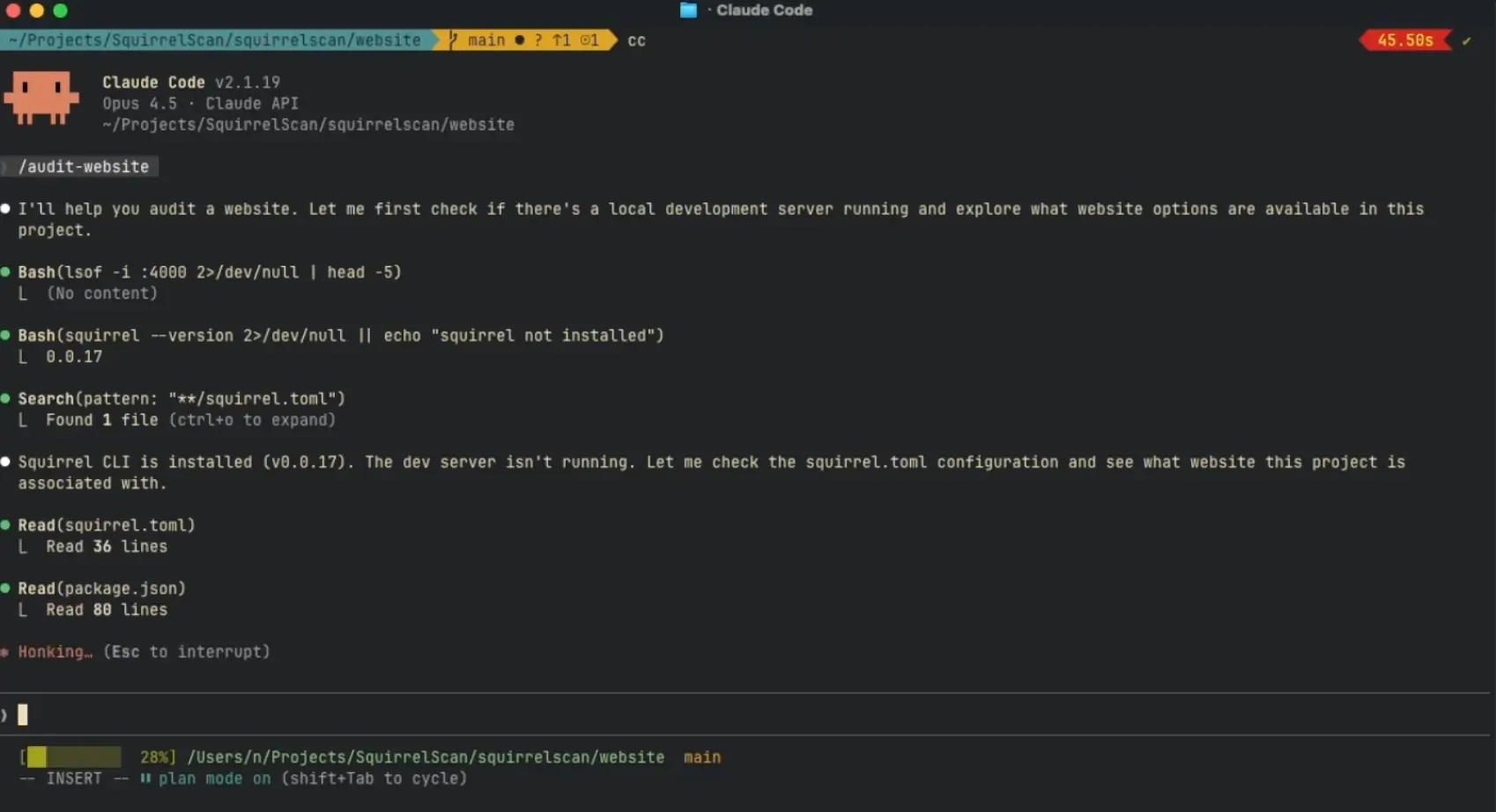
curl -fsSL https://squirrelscan.com/install | bashOnce installed, you trigger an audit from inside your AI coding agent by typing:
/audit-websiteIf you want to add it as a skill for your AI agent — meaning a reusable capability the agent can call on demand — you can install it via the Skills.sh platform:
npx skills install squirrelscan/skillsThe audit-website skill is also listed on Skills.sh and Skillstore.io for discovery.
What Does It Actually Check?
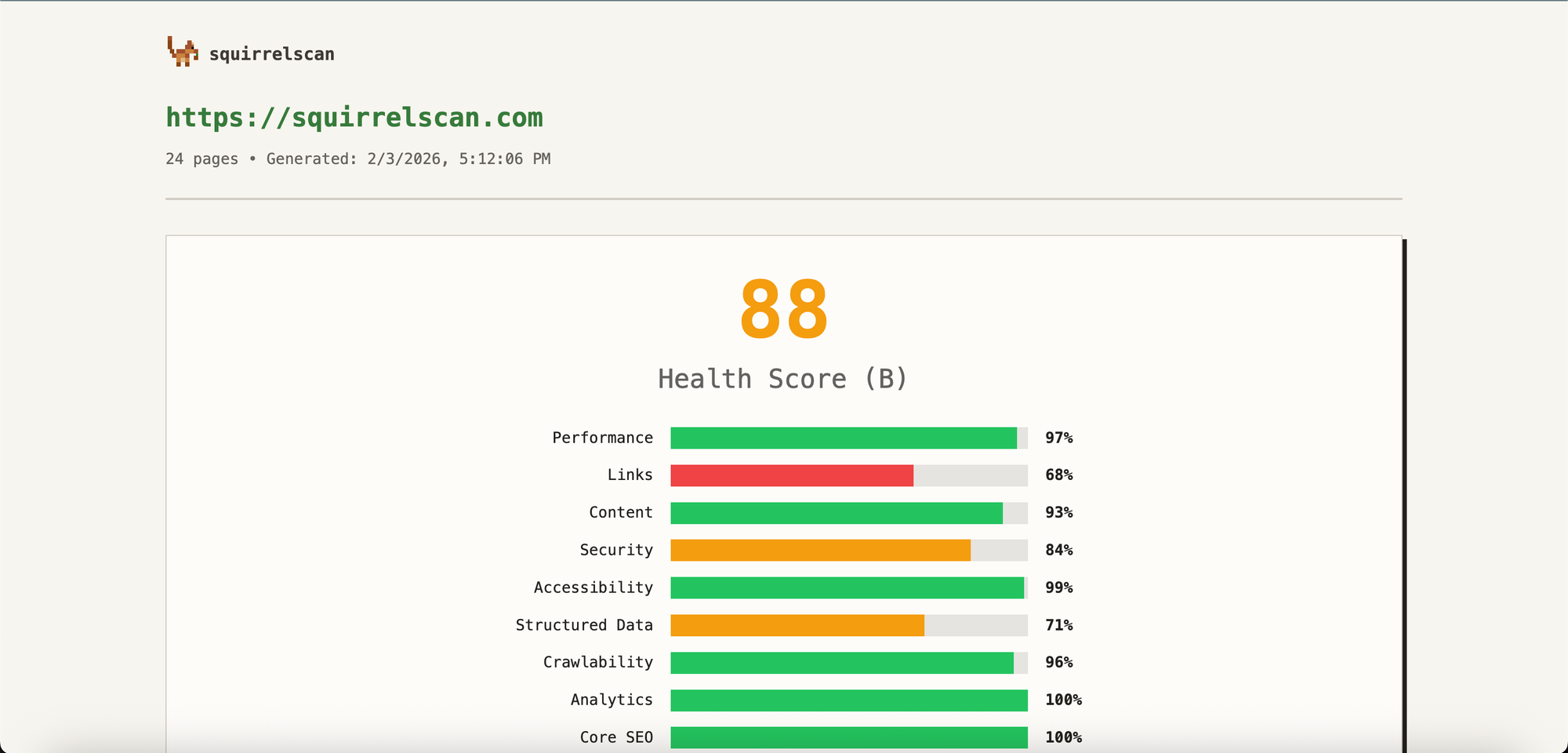
This is where SquirrelScan gets serious. According to its documentation, it runs 230+ rules across 21 distinct categories. Here's a breakdown of what's covered:
- Core SEO — Meta tags, canonical URLs, H1 tags, favicon
- Performance — Core Web Vitals including LCP, CLS, and INP (these are Google's page experience metrics)
- Accessibility — ARIA attributes, focus management, landmarks
- Security — HTTPS enforcement, Content Security Policy (CSP), and checks for accidentally leaked secrets in code
- E-E-A-T — Experience, Expertise, Authority, and Trust signals (Google's framework for evaluating content quality)
- Links — Broken internal and external links
- Schema — JSON-LD structured data validation
- Images — Alt text, dimensions, modern formats
- Mobile — Viewport settings, tap target sizing
- Legal — Privacy policies, cookie notices, terms of service
- AI (Beta) — LLM parsability checks and AI content detection
- Analytics — Google Tag Manager, consent mode setup
- Local SEO — NAP consistency (Name, Address, Phone), geo metadata
- i18n — Hreflang tags and language attributes for international sites
- Social — Open Graph tags, Twitter card metadata
- Content — Quality, readability, and content freshness
- Crawl — Robots.txt, sitemap, indexing directives
- URL Structure — Length, hyphen use, keyword inclusion
- Video — VideoObject schema, accessibility attributes
- Adblock (Beta) — Element hiding, blocked domain detection
Every rule produces a result with a severity level and an actionable fix suggestion — not just a flag that something is wrong, but guidance on what to do about it.
The Seven Output Formats
One of the more thoughtful design decisions here is how SquirrelScan handles output. Different consumers need different formats, so the tool supports seven of them:
- console — Colored terminal output for reading directly in your shell
- html — A rich, interactive web report with visualizations
- llm — A compact hybrid XML/text format optimized for AI agents, reportedly 40% smaller than standard XML to save on token usage (tokens are the units AI models use to read and process text)
- xml — Verbose structured XML for enterprise integrations
- json — Machine-readable structured data for custom tooling
- markdown — Formatted output readable by both humans and agents
- text — Plain text for simple parsing pipelines
The LLM format is particularly notable. When your AI agent is reading an audit report, every word costs tokens. A leaner format means the agent can process more data without hitting context window limits — context window meaning the maximum amount of text the model can read at once.
You can view a sample HTML report here to get a feel for what the visual output looks like.
Smart Crawling That Doesn't Waste Time
Re-crawling pages that haven't changed is wasteful — both in time and compute. SquirrelScan handles this with incremental crawling, using ETag headers, Last-Modified timestamps, and content hashing to skip pages that are identical to the last crawl.
It also supports resuming interrupted crawls from their exact stopping point, which matters when you're auditing large sites and something breaks midway through.
Over time, you can compare crawl history to spot regressions — situations where something that was working correctly has broken or degraded since the last audit.
CI/CD Integration
CI/CD stands for Continuous Integration / Continuous Deployment — the automated pipelines developers use to test and ship code. SquirrelScan is built to fit into these pipelines with standard exit codes that can trigger pipeline failures when audit rules are violated.
That means you can set up an automated check that blocks a deployment if, say, critical security headers are missing or the sitemap is broken. No human needs to remember to check.
Squirrelscan Demo Video
Who Is This For?
SquirrelScan is squarely aimed at developers who use AI coding assistants. If you're building or maintaining websites and you rely on tools like Claude Code or Cursor for day-to-day development, this gives your agent the ability to self-audit the sites it touches.
It's also useful for SEO-aware developers who want automated checks baked into their workflow rather than relying on manual audits or expensive SaaS platforms.
The free, open-source model with a single-binary install makes the barrier to entry very low. There's no account required to start running audits locally.
Current Status
SquirrelScan is currently in beta, sitting at version 0.0.38 as of the time of writing. Despite the early version number, it's already seeing real usage — the audit-website skill on Skills.sh reportedly pulls around 14,900 installs per week, and the GitHub repository has accumulated 169 stars.
Rules are described as continuously updated, and you can pull the latest version by running squirrel self update in your terminal.
Frequently Asked Questions
Is SquirrelScan actually free?
Yes. The CLI tool is free and open source. You can find the code on GitHub and install it without creating an account. There's also a web app at app.squirrelscan.com that requires login, though details on any paid tiers weren't available at the time of writing.
Does it work on Windows?
The homepage currently shows macOS as the primary install target with the curl command. The documentation at docs.squirrelscan.com would be the place to check for platform-specific install instructions.
What coding agents does SquirrelScan support?
It's explicitly built for Claude Code and Cursor, but because it supports JSON and Markdown output formats, it can technically work with any AI agent that can read structured text output.
How is this different from tools like Screaming Frog or Ahrefs?
Those tools are built around human dashboards and are typically SaaS products with subscription costs. SquirrelScan is a CLI-first, developer-native tool designed to be called programmatically by AI agents, integrated into CI/CD pipelines, and consumed by LLMs — not humans scrolling through a browser interface.
Can I share audit reports with clients or teammates?
According to a blog post from February 2025, SquirrelScan added a feature to publish and share reports via a shareable link, with options for public, unlisted, or private visibility. You can read more about it on the SquirrelScan blog.
Bottom Line
SquirrelScan is filling a genuine gap. Website auditing has always been one of those tasks that developers know they should do consistently but rarely have time for. By building a tool that an AI coding agent can run, interpret, and act on autonomously, SquirrelScan makes consistent auditing something that can actually happen in practice — not just in theory.
It's early — beta software with a sub-1.0 version number — but the breadth of rules, the thoughtful output formats, and the clean integration story with Claude Code and Cursor suggest it's worth watching. If you're already using AI coding agents in your workflow, getting started costs you about 30 seconds and a single terminal command.